Why?
So back in June, AB Pearce mentioned on the piclist that Microchip had introduced some dual-core PICs. Apparently they had been out for some time, and talked about in the Microchip forums, but I hadn't been aware.
So I did a little exploration, they look reasonable, checked out the pricing on Newark and Digikey, and ordered a couple dsPIC33CH128MP505 and a dsPIC33CH128MP506. I didn't really have the time to play with them, but I figured might as well have them on hand for whenever I did find the time.
Of course, the bright, shiny things kept calling, so more important things got pushed out of the way to play with the dual-core dsPIC.
Description
For my testing I selected the dsPIC33CH128MP505; with only a few LEDs and maybe later something else, there seemed to be no reason for the 64 pin dsPIC33CH128MP506.
The dsPIC33CH128MP505 is a 48 pin part, I ordered it in TQFP because I had some TQFP adapters that would work and there were no DIP parts. The master core is more or less as expected, 128K of flash program memory, 80 MIPS so a tad faster than my favorite dsPIC33EV. The slave core has 24K of program RAM, and at 100 MIPS is slightly faster still. Obviously, since the slave program memory is RAM, the slave program has to be loaded by the master, so it needs to be stored in the master flash.
Each core has its own set of peripherals, slightly different from each other. All input pins are accessible to both cores, but outputs must be assigned to one core or the other. Like other dsPIC33's, the peripheral complement is huge.
There is the typical set of PRI, FRC, LPRC oscillators, with or without PLL, shared by both cores. Each core can select the oscillator and has its own PLL chain. The PLL chain is slightly different from the dsPIC33E, but conceptually similar.
One interesting thing is that the datasheet indicated that the outputs can drive LEDs without the need for current limiting resistors. On my test board I used them anyway, because that's what I do.
Test board
In order to do something, I built up a simple test board. I generally power my PIC projects with a cell phone charger which provides 5 volts, so my board needed a 3.3 volt supply. A connector for programming, some assorted caps and resistors, and a few LEDs were all that I needed to hack together something to play on.
I am generally a little cavalier about bypass caps on prototyping boards, but in this case, the processor wouldn't run until I sprinkled a few around in obvious places. That is actually the first time I ran into that.
Programming the master
Getting the master to blink an LED was no big deal. The only surprise was that there are an incredible number of configuration bits. The bits are shared between master and slave. Many apply to both, but there are some that are specific to the core. All are provided in the master core's program.
Besides the fuses you might expect, every pin has a fuse to assign it to either the master or slave. There is a data direction fuse for each of the mailbox registers. There are also bits to enable each of the mailbox protocol blocks and to assign them to a mailbox register. Each of the four sets of alternate registers can be assigned to an interrupt level. The master and slave can each have independent ICD communications pins. All in all, an intimidating set of configuration fuses.
Once you get past the shock of the configuration bits, programming the master is unexciting, as long as you are only programming the master.
I did set up the master and slave program projects as subdirectories of a sort of master directory, and placed both projects in the same git repository. Although small repos are generally better, in this case the master and slave are closely linked, so it seemed to make sense.
Programming the slave
Getting the slave to run is quite another can of worms. There is, of course, the datasheet, the Family Reference Manual, and an application note, AN2721, which has some associated sample code. Even with this documentation, there are a number of secrets that aren't obvious.
The documentation seems to indicate that the slave program must have the same name as the master's, followed by S1. This doesn't seem to be a requirement, although I haven't tested that supposition. What you do need to do, though, is select a processor name followed by S1 when creating the slave project. So the project for dsPIC33CH128MP505 is the master program, and the slave program uses dsPIC33CH128MP505S1 as the processor type.
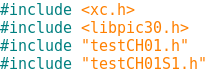
Since xc.h takes care of the processor, it isn't 100% obvious that there are also two header files, p33CH128MP205.h and p33CH128MP205S1.h, which becomes important because often the headers need to be explored to understand what the documentation means, or more often, to fill in the blanks.
Everything is slave 1 this and slave 1 that, so it appears Microchip is leaving the door open for parts with more than one slave core. Since the slave program has to be stored in the master's flash, it would seem that multiple slave versions are going to need an awful lot of flash.
The slave core's program is loaded with a call to
_program_slave(), obvious enough, and the slave started with a call to
_start_slave(). Also seems fairly obvious. However, the
_program_slave() call takes three arguments. The first is the number of the slave. The second is whether the program is to be "verified", whatever that means. The final is the address of the slave program.
And that's where it gets interesting. When creating the master project, a new folder, "Slaves", is created. The slave project must be added to this folder in master. So far, makes sense. If the slave program is going to be stored in the master flash, the master needs to know that it needs to be linked in.
The address in the master flash can be specified in the slave project properties in the Slaves folder. But, referencing that address in the
_program_slave call doesn't work!
The examples from Microchip all use the slave project name in the
_program_slave() call. However, simply stuffing that in doesn't work. The examples always included the slave's include file in the master's mainline, which I assumed somehow declared the symbol. But I could find no combination of attributes that worked. Worse, in the example code, I could never find that particular include file.
It turns out that referencing the slave's include file, even though it is in another project, does the trick. The include file can even be empty. I suspect it might not even need to exist, although I haven't tried that yet. Also note that
_program_slave() and
_start_slave() are defined in libpic30.h.
Once that was in place, I was able to flash an LED from the slave. But to understand that the master and slave were both working, I thought it would be helpful to start and stop the slave. While libpic30.h defines a
_start_slave() function, there is no function to stop the slave.
The slave is started by setting the
SLVEN bit in the
MSI1CON register. This register, like the EEPROM in the 8 bit parts, requires an unlock sequence. Since I may want to do this in the future, I wrote a
stop_slave() function.
I did find it rather curious that the assembler played like a compiler a bit, and modified my code. Where I cleared the
SLVEN bit (bit 15) in the
MSI1CON register, the generated object code cleared bit 7 in the
MSI1CONH register, apparently saving a little time.
I was now able to start and stop the slave as needed. In theory, one could have multiple slave programs and switch between them under master control. In this case it would be important to be able to stop the slave. Lacking a
stop_slave() function in libpic30 seems like a significant oversight.
Mailbox Communications
Now that I could program, start and stop the slave, the next step is communicating between the two. So on to sending data from the master to the slave. There are two ways to do this, through mailboxes or through a FIFO. I decided to try the mailbox first.
Slave Output
Being able to understand that I was successful in sending data from master to slave was going to take more than an LED as a way to let me know I was successful. Previously, I had built a PIC32 based
Serial Graphics Terminal for just this problem. So I added a connector for this terminal and a litttle code to communicate.
Unfortunately, I had some hassle with this. I'm not sure whether I forgot some initialization or didn't have the baud rate quite right, but the objective was to try out the mailbox communications, not debug the terminal, so I fell back to my
Simple Terminal which only does text. Since this application is really dumb and has no cursor control, it is fairly slow, but adequate for this purpose.
Mailbox Communications
The 33CH provides 16 mailbox registers which are visible to both master and slave. They are unidirectional; each must be assigned as master to slave or slave to master.
There are up to eight protocol blocks. A protocol block is a sequential group of mailboxes going in one direction. The final mailbox in the group triggers the transfer. Again, more configuration bits to enable a group and assign the register.
You can see how we come up with over 100 configuration settings.
Once the configuration bits are set, the exchange is fairly easy. The master enters the data into the mailbox registers, taking care to load the last register in the handshake block last. Writing the last mailbox sets the data ready bit for the slave.
Master then waits for the data ready bit to clear, indicating that the slave has retrieved the data.
On the slave side, it waits for the data ready bit, then reads the data. When the final mailbox is read, the data ready bit is automatically cleared.
Note that the registers have different names on the master and slave side.
 |
| Graphics Terminal Output |
FIFO Communications
FIFO communications, if anythig, is even simpler than mailbox, assuming no handshaking anyway.
The master and slave each have a control register for the FIFO,
MSI1FIFOCS for the master and
SI1FIFOCS for the slave. The receiver sets a read FIFO enable bit, while the sender sets a write FIFO enable bit. The sender then stores data into the FIFO which the receiver can retrieve.
As an example:
Summary
So the dual-core PIC is pretty manageable. There is still plenty to explore.
But I am thinking wouldn't it be nice to have the master run a DDS while the slave runs the keyer. I may need to try that.
The code for this is in
gitlab as always.
73 de WB8RCR