Showing posts with label git. Show all posts

Saturday, July 28, 2018

dsPIC33CH128MP505

Why?


So back in June, AB Pearce mentioned on the piclist that Microchip had introduced some dual-core PICs.  Apparently they had been out for some time, and talked about in the Microchip forums, but I hadn't been aware.

So I did a little exploration, they look reasonable, checked out the pricing on Newark and Digikey, and ordered a couple dsPIC33CH128MP505 and a dsPIC33CH128MP506. I didn't really have the time to play with them, but I figured might as well have them on hand for whenever I did find the time.


Of course, the bright, shiny things kept calling, so more important things got pushed out of the way to play with the dual-core dsPIC.

Description


For my testing I selected the dsPIC33CH128MP505; with only a few LEDs and maybe later something else, there seemed to be no reason for the 64 pin dsPIC33CH128MP506.

The dsPIC33CH128MP505 is a 48 pin part, I ordered it in TQFP because I had some TQFP adapters that would work and there were no DIP parts.  The master core is more or less as expected, 128K of flash program memory, 80 MIPS so a tad faster than my favorite dsPIC33EV.  The slave core has 24K of program RAM, and at 100 MIPS is slightly faster still.  Obviously, since the slave program memory is RAM, the slave program has to be loaded by the master, so it needs to be stored in the master flash.

Each core has its own set of peripherals, slightly different from each other.  All input pins are accessible to both cores, but outputs must be assigned to one core or the other. Like other dsPIC33's, the peripheral complement is huge.

There is the typical set of PRI, FRC, LPRC oscillators, with or without PLL, shared by both cores. Each core can select the oscillator and has its own PLL chain. The PLL chain is slightly different from the dsPIC33E, but conceptually similar.

One interesting thing is that the datasheet indicated that the outputs can drive LEDs without the need for current limiting resistors. On my test board I used them anyway, because that's what I do.

Test board


In order to do something, I built up a simple test board. I generally power my PIC projects with a cell phone charger which provides 5 volts, so my board needed a 3.3 volt supply. A connector for programming, some assorted caps and resistors, and a few LEDs were all that I needed to hack together something to play on.


I am generally a little cavalier about bypass caps on prototyping boards, but in this case, the processor wouldn't run until I sprinkled a few around in obvious places. That is actually the first time I ran into that.


Programming the master


Getting the master to blink an LED was no big deal. The only surprise was that there are an incredible number of configuration bits. The bits are shared between master and slave. Many apply to both, but there are some that are specific to the core. All are provided in the master core's program.

Besides the fuses you might expect, every pin has a fuse to assign it to either the master or slave. There is a data direction fuse for each of the mailbox registers. There are also bits to enable each of the mailbox protocol blocks and to assign them to a mailbox register. Each of the four sets of alternate registers can be assigned to an interrupt level. The master and slave can each have independent ICD communications pins.  All in all, an intimidating set of configuration fuses.

Once you get past the shock of the configuration bits, programming the master is unexciting, as long as you are only programming the master.


I did set up the master and slave program projects as subdirectories of a sort of master directory, and placed both projects in the same git repository. Although small repos are generally better, in this case the master and slave are closely linked, so it seemed to make sense.


Programming the slave


Getting the slave to run is quite another can of worms. There is, of course, the datasheet, the Family Reference Manual, and an application note, AN2721, which has some associated sample code.  Even with this documentation, there are a number of secrets that aren't obvious.

The documentation seems to indicate that the slave program must have the same name as the master's, followed by S1. This doesn't seem to be a requirement, although I haven't tested that supposition. What you do need to do, though, is select a processor name followed by S1 when creating the slave project.  So the project for dsPIC33CH128MP505 is the master program, and the slave program uses dsPIC33CH128MP505S1 as the processor type.


Since xc.h takes care of the processor, it isn't 100% obvious that there are also two header files, p33CH128MP205.h and p33CH128MP205S1.h, which becomes important because often the headers need to be explored to understand what the documentation means, or more often, to fill in the blanks.

Everything is slave 1 this and slave 1 that, so it appears Microchip is leaving the door open for parts with more than one slave core. Since the slave program has to be stored in the master's flash, it would seem that multiple slave versions are going to need an awful lot of flash.

The slave core's program is loaded with a call to _program_slave(), obvious enough, and the slave started with a call to _start_slave(). Also seems fairly obvious. However, the _program_slave() call takes three arguments. The first is the number of the slave. The second is whether the program is to be "verified", whatever that means. The final is the address of the slave program.


And that's where it gets interesting. When creating the master project, a new folder, "Slaves", is created. The slave project must be added to this folder in master. So far, makes sense. If the slave program is going to be stored in the master flash, the master needs to know that it needs to be linked in.


The address in the master flash can be specified in the slave project properties in the Slaves folder. But, referencing that address in the _program_slave call doesn't work!


The examples from Microchip all use the slave project name in the _program_slave() call. However, simply stuffing that in doesn't work. The examples always included the slave's include file in the master's mainline, which I assumed somehow declared the symbol. But I could find no combination of attributes that worked. Worse, in the example code, I could never find that particular include file.

It turns out that referencing the slave's include file, even though it is in another project, does the trick. The include file can even be empty.  I suspect it might not even need to exist, although I haven't tried that yet. Also note that _program_slave() and _start_slave() are defined in libpic30.h.
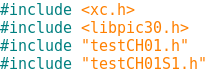

Once that was in place, I was able to flash an LED from the slave. But to understand that the master and slave were both working, I thought it would be helpful to start and stop the slave.  While libpic30.h defines a _start_slave() function, there is no function to stop the slave.

The slave is started by setting the SLVEN bit in the MSI1CON register. This register, like the EEPROM in the 8 bit parts, requires an unlock sequence. Since I may want to do this in the future, I wrote a stop_slave() function.


I did find it rather curious that the assembler played like a compiler a bit, and modified my code. Where I cleared the SLVEN bit (bit 15) in the MSI1CON register, the generated object code cleared bit 7 in the MSI1CONH register, apparently saving a little time.

I was now able to start and stop the slave as needed.  In theory, one could have multiple slave programs and switch between them under master control. In this case it would be important to be able to stop the slave. Lacking a stop_slave() function in libpic30 seems like a significant oversight.

Mailbox Communications

Now that I could program, start and stop the slave, the next step is communicating between the two. So on to sending data from the master to the slave. There are two ways to do this, through mailboxes or through a FIFO. I decided to try the mailbox first.

Slave Output

Being able to understand that I was successful in sending data from master to slave was going to take more than an LED as a way to let me know I was successful. Previously, I had built a PIC32 based Serial Graphics Terminal  for just this problem.  So I added a connector for this terminal and a litttle code to communicate.

Unfortunately, I had some hassle with this. I'm not sure whether I forgot some initialization or didn't have the baud rate quite right, but the objective was to try out the mailbox communications, not debug the terminal, so I fell back to my
Simple Terminal which only does text. Since this application is really dumb and has no cursor control, it is fairly slow, but adequate for this purpose.


Mailbox Communications


The 33CH provides 16 mailbox registers which are visible to both master and slave. They are unidirectional; each must be assigned as master to slave or slave to master.


There are up to eight protocol blocks. A protocol block is a sequential group of mailboxes going in one direction. The final mailbox in the group triggers the transfer. Again, more configuration bits to enable a group and assign the register.


You can see how we come up with over 100 configuration settings.

Once the configuration bits are set, the exchange is fairly easy.  The master enters the data into the mailbox registers, taking care to load the last register in the handshake block last. Writing the last mailbox sets the data ready bit for the slave.


Master then waits for the data ready bit to clear, indicating that the slave has retrieved the data.

On the slave side, it waits for the data ready bit, then reads the data. When the final mailbox is read, the data ready bit is automatically cleared.


Note that the registers have different names on the master and slave side.

Graphics Terminal Output


FIFO Communications

FIFO communications, if anythig, is even simpler than mailbox, assuming no handshaking anyway.

The master and slave each  have a control register for the FIFO,  MSI1FIFOCS for the master and SI1FIFOCS for the slave. The receiver sets a read FIFO enable bit, while the sender sets a write FIFO enable bit.  The sender then stores data into the FIFO which the receiver can retrieve.

As an example:


Summary


So the dual-core PIC is pretty manageable. There is still plenty to explore.

But I am thinking wouldn't it be nice to have the master run a DDS while the slave runs the keyer.  I may need to try that.

The code for this is in gitlab as always.

73 de WB8RCR

Tuesday, October 20, 2015

A working dsPIC-EL

After deciding a long time ago that I wouldn't do a dsPIC-EL, nor an Elmer 166, I decided to do a dsPIC-EL, but the Elmer 166 is only kind of.

When I broke down and did the club thermometer project (http://elmer166.blogspot.com/2015/08/club-project-thermometer.html) I realized how straightforward a PCB can be.  OK, I am clumsy at it and it takes a few cycles, but the result is very satisfying.

The PIC24FV16KM202 used in the thermometer, and it's sister the PIC24FV32KA302 were something of a revalation.  The peripheral complement is absolutely breathtaking, and the peripheral pin select allows for a lot more flexibility than the dsPIC30F family.

I ran into to project where I wanted a little more speed, and tripped across the dsPIC33EV256GM102.  Astonishing!  70 MIPS, gobs of memory, PPS like the 24FV, and the family of dsPIC33EVxxGMyzz lets you select memory size, pin count, and network from a family of otherwise identical parts.

I started working on a dsPIC-EL board based on this part, and realized that the pinout was virtually identical to the PIC24FV series.  I could choose between dsPIC33EVxxGMx02, PIC24FV16KM202, and PIC24FVxxKAy02 parts by the simple addition of a jumper.


dsPIC-EL

From the work on the dsPIC30F board I recognized that Arduino-style header connectors were a worthwhile addition.  With the thermometer project I had also recognized that I could get proto boards custom made for less money and higher quality than I could buy already made. It was a short step to realizing that if I bought the long pin headers used by Arduino shields in quantity, I could have shields for under three bucks.

dsPIC-EL with proto shield fitted


Somewhere around this time I got roped into working with the high school electronics club.  The students early on expressed a strong interest in building stuff they could program.  This, of course, pushed me into moving along much quicker on the dsPIC-EL, and I can pretty much call it soup now.

Of course, I want to share this development, so all the work is on GitLab, but I have no interest in kitting the thing.  The good news is that the boards can be had quite cheaply, and there are really no hard parts (although some parts are a lot cheaper in quantity).  If all the parts were purchased in quantity one, I suspect it could be had for around the cost of a PIC-EL.  Buying things like connectors in quantity cuts the cost to less than half.  The main disadvantage to some of the large quantity parts is lead time.

The dsPIC33EV256GM102 is kind of pricey, but the 32K version without the CAN (which is unlikely to be needed) can be had for less than the price of a PIC24FV, which itself makes 16F and 18F parts look expensive.

So, the main features:
  • PIC with pins brought out to Arduino connectors for easy prototyping
  • Extra connector to allow ordinary perfboard to be used as a shield
  • LCD and buttons on the base board.  You always want these, and they have the annoying feature of needing to be on the "top" shield which really limits flexibility if they are on a shield.
  • All used pins jumpered so they can be used for prototyping without interference from on-board parts
  • A few LEDs thrown in for good measure
  • Power from a cell phone charger with an XH connector for batteries or some other external supply
  • PICkit connector for programming
  • Jumper to allow PIC24FV to be used

Schematic


I don't plan to do another Elmer 160 type class, but I will be guiding the high school club's members through learning the dsPIC, and I will be putting my materials on GitLab, so they will be available to anyone who is interested.  Rather than PDF prose, most will be PowerPoint (well, actually LibreOffice).  Of course, high school kids pick up things a lot quicker than us old hams, so the material will be quite a bit different.

The key repositories are:

The PCB including Gerbers.  The README for this repository includes the schematic and a red/blue image of the board.  The BOM in this repository also contains information on sources.
https://gitlab.com/33E-simple/dsPIC-EL-GM

The ProtoShield gerbers
https://gitlab.com/33E-simple/ProtoShield

An LCD library
https://gitlab.com/33EV-GM1/LCD.X

An I2C library
https://gitlab.com/33EV-GM1/I2C.X

Presentations (under development)
https://gitlab.com/33EV-GM1/dsPIC-presentations

Construction instructions (under development)
https://gitlab.com/E-WCC/dsPIC-EL_Build_Instructions

If you want to get boards made, simply upload the zip file containing the Gerbers to
http://makerstudio.cc/index.php?main_page=product_info&cPath=8&products_id=14
The price is around $16 for 10 boards including shipping.  Shipping seems to vary a bit, I assume based on exchange rates.  It takes about three weeks for the boards to reach the U.S.  I have also used Accutrace in cases where I want boards a little sooner (8 days).  Their price of $40 for 10 is quite a bit higher than MakerStudio, but not crazy, and their customer service is tops.  Their boards are a little higher quality than the Chinese boards, but you need to look really close to tell the difference.

Saturday, August 8, 2015

Club Project - Thermometer

Recently the local radio club needed something to spice things up, and the idea of a construction project based on a PIC seemed to be well received.  I came up with the idea of a PIC based thermometer, a little off the beaten path perhaps, but easily done.


An awful lot of PIC projects involve nothing more than an LCD and a sensor of some type.  Everyone has done some sort of test instrument; counters, capacitance meters, dip meters, signal generators, and on and on.  But a lot of the club members don't do a lot of building, and while a counter is kind of cool, it only appeals to the more technical members.

A thermometer, on the other hand, is something that everyone can get behind.  Perhaps you won't play with it for very long, but you will play with it.  You will hold the temperature sensor and watch it warm up, you might put it in the freezer, perhaps it will find a permanent home in the greenhouse.  But it is something everyone can at least play with, if only briefly.

I also wanted to try to inspire folks to pick up a soldering iron and perhaps grok a little code long after the build session.  A thermometer based on the Maxxim/Dallas DS1821 is dead simple, and as a totally digital solution requires no calibration, and the adventuresome could easily stick the sensor on the end of a long wire to put it in the garage, or in the garden, or wherever.

For similar reasons I chose the PIC24FV16KM202.  It has a lot of left over pins to tempt people to try other stuff, it has an amazing complement of peripherals to play with, and it is dirt cheap.

We milked the project for several months. First, I did a presentation on PICs in general, went on about how easy they are to use, how cheap, and how flexible they can be.  The next month another ham did a presentation on microprocessors in general, and the differences between microprocessors and microcontrollers.  Then I did presentations on the hardware and software for our build project.  Finally, on a Saturday, we all got together and melted solder.

We also did the project at the local high school radio club.  That was a lot shorter.  Kids of that age are like sponges when it comes to knowledge, and they were no virgins to electronics, so the whole process was a lot quicker!

We did a total of around 30 of these thermometers, only one didn't work when first powered up, and that was a cold solder joint dealt with in just a few minutes.  Not bad for a group that mostly had never held a soldering iron before.  I credit part of that to the very detailed construction instructions (see link below).

We have had some success with folks going out playing on their own.  Not as much as I would like to see, but something is better than nothing.

I had the boards made at Maker Studio.  They will make boards up to 10x10cm for a fixed price.  I filled the unused part of the board with prototyping area in an attempt to get people to try things.

The Circuit


Basically, the circuit is nothing more than a PIC, an LCD, and the temperature sensor.  In order to make it simple to get going in the build session, the project was powered by 3 AA batteries.  Because of this, the LCD backlight was not used, although the board provided a jumper to enable it, and a micro-USB connector to enable powering the project from a cell phone charger.  An LED was also provided to indicate the program was working, but also to provide experimenters with something else to play with.


In addition to the PIC, LCD and temperature sensor, the LCD requires a contrast pot, the LED a current limiting resistor, and the DS1821 a pull up resistor.  A reset button was added, along with a few caps.  The PIC24FV16KM202 requires a 10u cap because it is basically a 3 volt PIC running at 5 volts, and it is always good to sprinkle a bypass cap here and there.

The odd values on the resistors are simply because I had bought thousands of those values cheap, and they are in places where the actual value is horribly non-critical.

The PCB

The initial plan was to build the project on perfboard.  That way folks could get the idea that they could simply build whatever they wanted.  But eventually it was decided to do a printed circuit board.  Perfboards are pretty expensive, and if you are willing to wait a few weeks, a PCB can be real cheap.  Plus, it makes it harder for new builders to make errors, especially if the PCB is heavily silk screened.  Later I actually had custom perfboards made,  Turns out that one can get very high quality glass-epoxy boards exactly to your own specifications cheaper than crummy phenolic boards locally.


Of course, the PCB had to include a programming connector (left edge).  As mentioned before, a connector for a cell charger (right) and a simple, two-pin connector for the batteries which are mounted on the back.  The PIC's internal oscillator was used for the project, but pads for a crystal and the associated caps were provided in case the experimenter felt a need for crystal control.  The remainder of the board is filled with prototyping space.

The Software

The PIC is run at a low speed to maximize battery life, and mostly sleeps.  The watchdog timer wakes the PIC about once a minute to take a sample and then go back to sleep.  The PIC only draws microamps when sleeping, although much of that advantage is swamped by the LCD which draws significant current even without the backlight.

The LCD and DS1821 code was buried in libraries to make it easier to talk about the overall logic without getting buried in the details of the specific devices.


The Links

Other clubs might find this a useful project.  All of the source code, schematics, PCB layouts, Gerbers, presentations and the construction manual are all available on GitLab.

The presentations are in OpenOffice Impress format, although the repositories also contain a PDF version.  The construction manual was developed using Publican, but the final result is PDF.  The schematics and PCB were developed using the gEDA tools gschem and pcb.  The source is all MPLAB-X/xc16 code.

Friday, June 27, 2014

MPLAB-X git plugin

I was pleased to learn there is a git plugin for MPLAB-X.  I use git heavily, and having it inside the IDE could be a win.  I downloaded the plugin from https://code.google.com/p/nbgit/downloads/list?q=0.4 and it installed without much grief.  (OK, installing a NetBeans plugin is a little weird, but MPLAB makes it fairly obvious.)

Initially I was quite impressed.  The basic things you need to do are right there at your fingertips. To initialize a git repository, you simply choose Initialize Project from the Team menu:

Once you have initialized a repository, the git menu choices show on the main Team menu rather than the Git submenu.

You commit changes to the repository by selecting Commit:

You will be prompted for a commit message where you note down what this particular change was about:


You can view the history of your project with the Browser:
Notice that if you highlight one of the commits, the center pane shows the commit details.

Any changes you make which have not been committed are highlighted in the source window:


You can also select Diff and see changes across all files, including deleted lines:

There are also a couple of nice little touches.  If a project is in git, there is a tiny blue icon next to the project icon to let you know:


And any files with uncommitted changes have their name shown in blue both in the tab and in the Projects pane and the Files pane:


One place where the plugin falls down, badly IMO, is in support for branches.  git branches are easy and lightweight, and as a result they are used more often than they are in previous systems.

As an example, when opening a project (shown below in gitg) which had multiple branches:

The plugin only shows the current branch.  You cannot select a branch, and you don't even know that other branches exist.

However, if you merge the branch back into master, you at least see the branch name as well as the master branch:

The other shortcoming is that the Diff only shows differences between the locally, uncommitted changes and the HEAD.  There doesn't appear to be a way to see differences between two commits.

There is also little support for remote repositories.  You can clone a remote repository, but you cannot push changes back.  And of course, with no support for branches you can't checkout remote branches.

Still, for most of what you would want to do, other than perhaps remote repositories, everything is there and easy.  The plugin also allows you to  add your own commands, so simply adding a Push command covers probably 90% of what I would normally do.

So I have to break down and go to the command line for branches, but that isn't a very high price, and it only needs to be done when switching or merging branches, which doesn't happen very often.

All in all, a really nice improvement in an already impressive IDE.

Saturday, November 24, 2012

git

Years ago, back in the late 90's, I built a CW decoder designed by Franceso Morgantini, IK3OIL.  It may be that this project actually got me interested in developing on  microcontrollers.  Not being able to let well enough alone, I made a  number of improvements (IMO) to Francesco's work.  And I reported it on my amateur radio web page.

I have always been a proponent of revision control systems.  Over the years I have found I often want to ressurect old code for some reason, and having an RCS not only made it easier to find old stuff, but also to understand what it had been through, something especially helpful if you intend to hack it up.

Back in the late 80's, it was PVCS on DOS and later Windows.  PVCS, it turns out, was a proprietary port of the ancient RCS to DOS.  Eventually the repository format changed to something more proprietary, and I began developing on more platforms, so I ended up moving most of my old PVCS repositories to RCS.

RCS stayed with me for years and years, through DOS, Windows, OS/2, Linux.  VMS had it's own system, CMS, which was actually pretty good so while I believe I ran RCS on VMS a little, it was never bread and butter on  that platform.  RCS had many, "better" descendants, CVS, SVN, etc., but RCS stuck with me since it did the job and  was available on every platform known to man, much like my beloved Emacs.

Somewhere around 2004 I realized that my PIC code really needed to be in a repo, so I reconstructed as best I could the history of my major PIC projects into RCS.

The PIC development platform, MPLAB, underwent many changes over the years, but the change from MPLAB 5 to MPLAB 6 was pretty major, and I wasn't able to reconstruct the links between those lines of development, so I made separate repos for MPLAB 5 development and MPLAB 6, 7 and 8 development which I prefixed with MPLAB_5 and MPLAB_7.

A few years ago I discovered git.  git has a few regressions from RCS, but it is so much easier to use that the incentive is to use it more.  So all my repos got converted to git.

Unfortunately, at the time, I hadn't yet learned the beauty of branches.  Recall that on RCS and it's descendants, branches are a major pain, so it took me some time to warm up to them.

But when I converted my repos to git, the independent repos from RCS got converted to independent repos on git.  With the MPLAB 5 vs. 7 stuff, it would have made much more sense to have branches, but I didn't know that at the time.

Circling back to the CW reader, from time to time I get a request for that code, especially since Francesco's original code has apparently disappeared from the web.  I recently got a request from a ham in Scotland, and when I grabbed the code for him, I realized I had been sending out the old MPLAB 5 code, which probably made life difficult for folks wanting to use it.

So, I duplicated the MPLAB 5 repo, and made a branch for the MPLAB 7 stuff, *AND* put it all in github, along with a rather elaborate README, so that folks could grab the code from there and if they needed some earlier variant they could see the genesis of the thing.

All this came just as I was struggling with getting a dsPIC30F4013 to talk to an MCP23008, and had just had the aha moment that even though this is a hack and of no permanent value, it still makes sense to put it in a repo and commit like a man posessed, so when the change to make B work causes A to quit, I can easily go back and see where I shot myself in the foot.

git is great!

Which brings me back to Elmer 166.  It is clear to me that anyone who thinks he can do serious development without git is either brain dead or a masochist. So it looks like something I should cover.  On the other hand, it is kind of off topic.  And the folks likely to take the course are probably somewhat unlikely to warm up to it, unless I can present it in a really appealing way.

So, more decisions.